- BRIEF -
"Modern Solutions for Medieval Problems" is an FPS project I am in the process of developing using only free assets (and a few I modelled myself). In the process of developing it, some of the existing code had become obsolete and/or inefficient, requiring redevelopment. I first chose to fix the existing logic on the doors within the game.
The Challenge
When I first began coding the door logic, I aimed to make the scripts as versatile as possible by having one script handle trigger logic, door movement and key collection. The result of this was a messy script that caused confusion, as many variables were displayed unnecessarily on the attached game objects (e.g. Door position variables on a key). The movement logic was also placed within the Update function, forcing the game to check against two conditions every frame. This was very wasteful as the key prefab never needed to move and the code would continue to execute movement after the door had already reached its final position. And thirdly, triggered objects required the related components to be set within the editor, something that could easily be missed when preparing the level. The old code can be seen below.
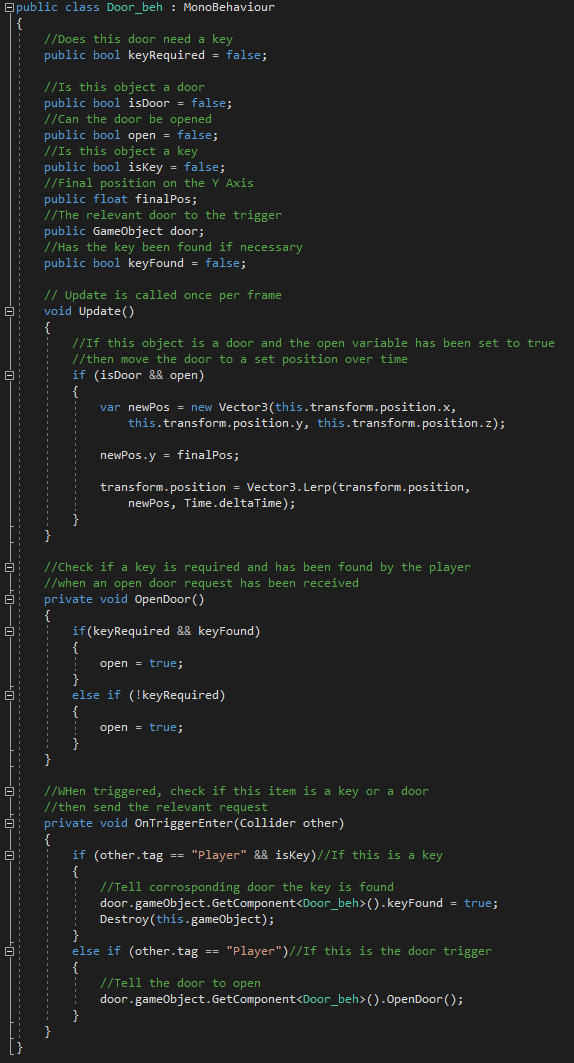
Old Script
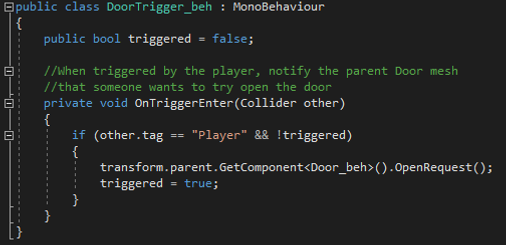
New Stand-alone Trigger Script
- TIME TO FIX -
The first thing I did was to break the script apart into three constituent scripts. One for each door related component I had in my game, the main door, the trigger and the key. Easiest of all is the trigger, upon being entered by the player it notifies its parent door component of the event and executes the OpenRequest function then setting itself inactive to avoid accidental future execution.
See new code
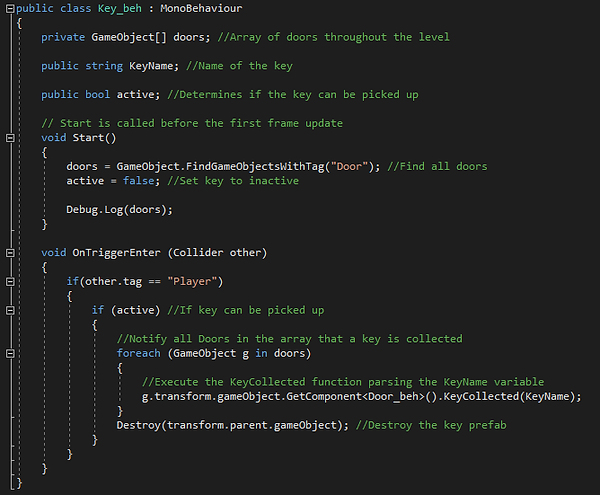
The second script is focused on the Key behaviour. Since the key is spawned on an enemy it has to remain inactive until the enemy drops it. Upon being dropped, the enemy script sets the active Boolean to true, allowing the key to be picked up by the player. The key holds a list of all the doors in the level, upon collection it iterates through each door on the list executing a public KeyCollected function, parsing its own name. Once completed, it destroys the holding parent object to disappear.
The final script to create was the Door logic. The only details I needed to know were the time it takes to open the door, the position the door will move to on the Y axis and the name of the unlocking key. From there I required the KeyCollected function called by the Key script that checks if the name of the parsed key matches the key that unlocks this door, and the OpenRequest function called by the trigger. To prevent unnecessary code execution all update calls have been removed, this implemented a new problem of how I would smoothly move the door from the start to the end position. With some research I determined how to use Vector3.Lerp outside of the Update function. An Enumerator and a While loop could be made to do the same job with the source position, destination and open time parsed to it.
- WHAT I LEARNT -
The final outcome was a much more versatile set of scripts that could be easily implemented in my ongoing project that was significantly less confusing and much more efficient at doing the same job as the initial concept script. The lessons I learnt from this have helped in my approach to scripting other game mechanics more efficiently and logically from the beginning.

New Stand-alone Door Script
New Stand-alone Key Script